
Quantizing Models
You can quantize an existing diffusion model yourself. Any .safetensors, .ckpt, .pt, .pth, or .bin checkpoint works as a source. This page covers the three ways to convert: a ComfyUI node, a command line tool, and a local web dashboard. All three live in the comfyui-gguf-reboot node pack and produce files that load with the GGUF loader nodes.
Before you start
You need a few things first:
- The source checkpoint in a supported format. It must be a plain diffusion model file, not an already quantized GGUF.
- Enough free disk space for the output file.
- The converter loads the model to RAM while it reads and quantizes weights. For big video models, enable streaming as described below.
A quant can never go back to full precision, so always quantize from the highest-precision source you have.
Targeted Quantization (GGUF) node
The Targeted Quantization (GGUF) node converts a checkpoint from inside a ComfyUI workflow. You can wire it into your normal setup and export a GGUF without leaving ComfyUI.
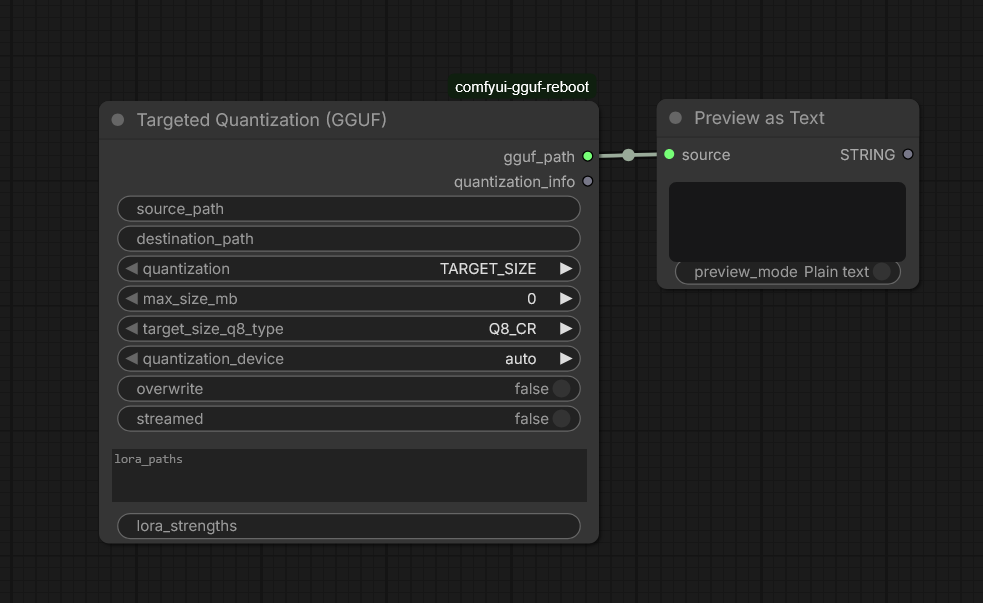
Inputs:
| Input | What it does |
|---|---|
| source_path | Absolute path to the source checkpoint on disk. |
| destination_path | Output .gguf path. Leave empty to derive it from the source name. |
| quantization | Output format. Choose a standard format, a uniform or mixed K-quant format, or TARGET_SIZE for a size budget. |
| max_size_mb | Output size cap in MiB. Required only for TARGET_SIZE. |
| target_size_q8_type | Baseline format for TARGET_SIZE: Q8_CR or Q8_0. |
| quantization_device | Q8_CR and Q4_CR conversion device: auto, cpu, or cuda. (Only Q8_CR and Q4_CR quants can be accelerated, all other formats are quantized on CPU) |
| overwrite | Replace an existing output file. |
| streamed | Process one tensor at a time to reduce RAM and VRAM use. |
| lora_paths, lora_strengths | Optional LoRA files to merge during conversion. |
The node reports loading and conversion progress on the ComfyUI progress bar and outputs gguf_path plus quantization_info, which includes the final file size. Copy the gguf_path output into an Unet Loader (GGUF) node to test the result right away.
Command line conversion
The same converter runs from the node pack's tools folder. This is the better choice for one-off conversions of many models, because the CLI queues without a UI.
NOTE
You likely have a python virtual environment (or similar) for ComfyUI. You will need to activate it for conversion to work.
From the ComfyUI-GGUF directory:
python tools\convert.py --src C:\models\my_model.safetensors `
  --dst C:\models\my_model-Q8_CR.gguf --quant-type Q8_CR
On a portable ComfyUI install, use the embedded Python:
.\python_embeded\python.exe .\ComfyUI\custom_nodes\ComfyUI-GGUF\tools\convert.py ^
  --src C:\models\my_model.safetensors ^
  --dst C:\models\my_model-Q8_CR.gguf --quant-type Q8_CR ^
  --quantization-device auto
Useful flags:
| Flag | Purpose |
|---|---|
--quant-type | Output format: BF16, Q8_0, Q6_K, Q5_K, Q5_K_S, Q5_K_M, Q4_K, Q4_K_S, Q4_K_M, Q5_1, Q5_0, Q4_1, Q4_0, Q8_CR, Q4_CR_W4A4 (or Q4_CR), or Q4_CR_L. |
--max-size-mb | Target-size mode, capped at the given MiB. |
--target-size-q8-type | Baseline for target-size mode: Q8_CR or Q8_0. |
--quantization-device | Device for Q8_CR and Q4_CR conversion: auto, cpu, or cuda. |
--streamed | Tensor-by-tensor processing for safetensors sources. |
--lora and --lora-strength | Merge LoRA adapters before quantizing. Repeat for several adapters. |
Local conversion dashboard
If you prefer a browser UI, start the conversion dashboard from the ComfyUI-GGUF directory:
NOTE
You likely have a python virtual environment (or similar) for ComfyUI. You will need to activate it for conversion to work.
python tools\conversion_webui.pyThen open http://127.0.0.1:8189. The dashboard lets you configure conversions and queue multiple quantization formats in a single batch.
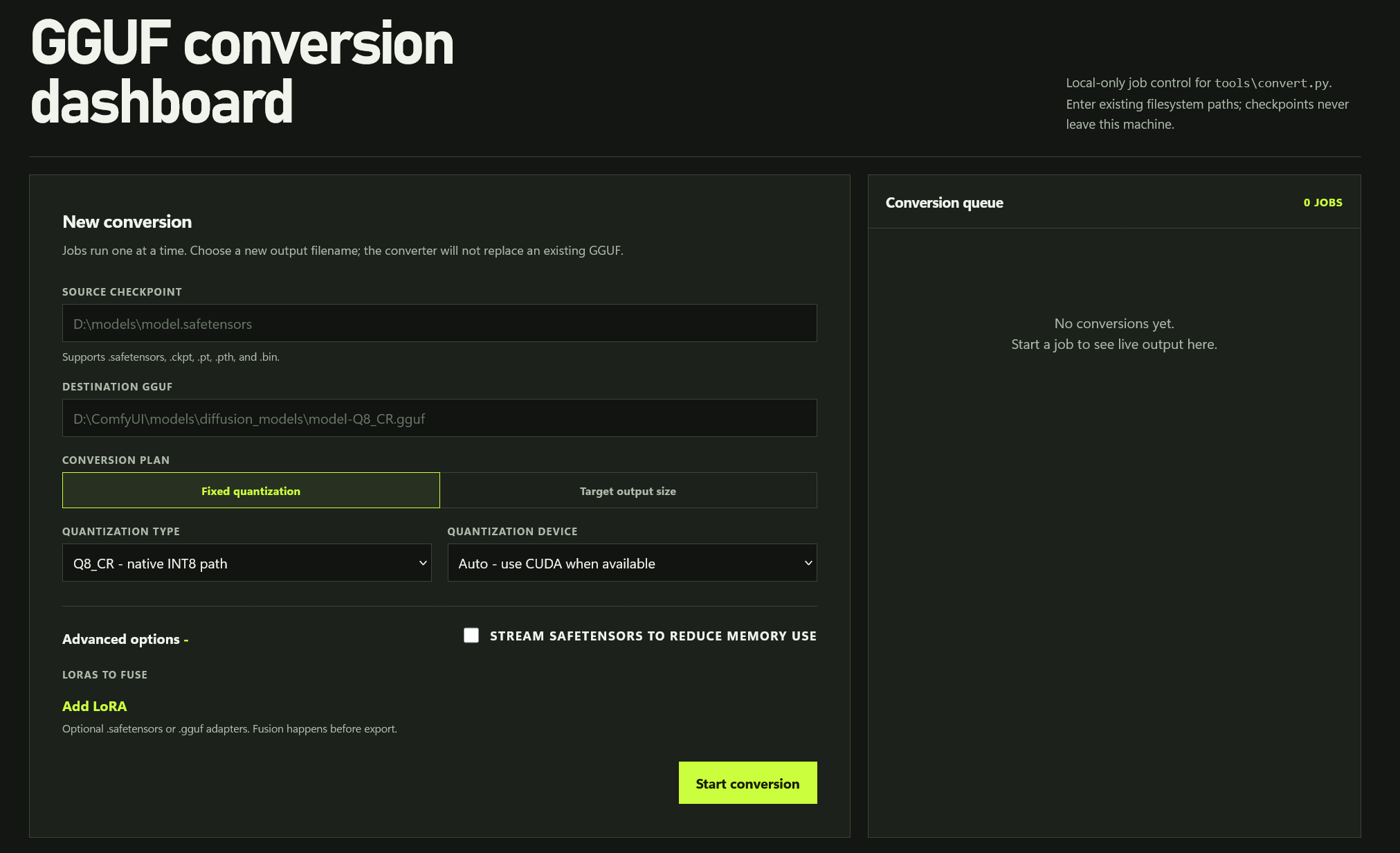
It listens on the local machine only. Enter filesystem paths for the source and destination, as it does not upload your checkpoints. In Fixed quantization mode, you can select one or more formats, and the converter appends each format's postfix to the destination filename. You can also switch the conversion plan to Target output size, choose the quantization device, fuse LoRAs, or stream safetensors from disk. The conversion queue runs one job at a time to avoid competing for GPU memory, and each job has a full-screen view for logs. Use --port <port> for a different port, or --no-browser to skip auto-opening a tab.
Choosing a quantization format
The conversion tools expose these formats. For how they compare in practice, see Quant Formats.
| Format | Recommended use |
|---|---|
| BF16 (or Source) | Lossless re-pack that preserves F16 or BF16 source precision. |
| Q8_0 | Portable, high quality 8-bit. A safe default. |
| Q8_CR | Maintainer recommendation for NVIDIA RTX 30-series. Native INT8 execution with strong quality. |
| Q4_CR | Native INT4 execution with INT4 activations (w4a4). Roughly Q4_0 file size, slightly faster than Q8_CR. |
| Q4_CR_L | Native INT4 weights with INT8 activations (w4a8). Better quality retention than Q4_CR_W4A4 at nearly the same file size, at ~Q8_CR speed. |
| Q6_K, Q5_K, Q4_K | GGML K-quants for smaller files. Inference dequantizes to floating point by default and can be slower for diffusion. |
| Q5_K_S, Q5_K_M, Q4_K_S, Q4_K_M | Mixed K-quant layouts with different tensor precision allocations. |
| Q5_1, Q5_0 | Middle ground between 8-bit and 4-bit. |
| Q4_1, Q4_0 | Smallest files for tight VRAM. Largest quality trade-off. |
| TARGET_SIZE | Mixed build under a size budget, described below. |
The converter can create uniform Q4_K, Q5_K, and Q6_K GGML formats, as well as mixed Q4_K_S, Q4_K_M, Q5_K_S, and Q5_K_M formats. K-quant creation uses a bundled GGML-compatible encoder and does not require the installed gguf package to write K blocks. Eligible rows must be divisible by 256; incompatible tensors are rejected with their name and shape. Architecture-protected and unsupported tensors retain higher precision.
K-quant GGUFs can be loaded for diffusion models and text encoders. By default, K-quant Linear weights are dequantized to floating point before PyTorch computation. This can reduce file size, but it does not provide native low-bit matrix multiplication and may slow diffusion denoising. An experimental Triton decode backend is available only as an opt-in and accelerates a limited set of Q5_K/Q6_K Linear shapes on CUDA SM 8.6. It remains disabled by default; see the K-quant inference notes for limitations and benchmark results. Do not expect a speedup without testing your model and GPU.
Target size quantization
Set the quantization to TARGET_SIZE and give a max_size_mb budget. The converter builds the best mix that stays under that size:
- Core 2-D Linear weights start at the chosen Q8 baseline, Q8_CR by default.
- Matrices closest to the model's center drop to Q5_0, then Q4_0, until the file fits the budget. The beginning and end of the model stay at higher precision for as long as possible.
- If everything is already Q4_0 and the file is still too large, ordinary 1-D tensors drop to BF16. Protected and architecture-sensitive tensors stay FP32.
Q4_0 is the smallest supported core format. A budget below the minimum possible size fails with an error that reports that minimum, because Q3 and lower are currently not used.
Pass --target-size-q8-type Q8_0 (or select Q8_0 in the node or dashboard) to get a standard GGUF baseline instead of the Q8_CR INT8 layout. Choose that when portability to other runtimes matters more than native INT8 speed.
Streaming for large models
The conversion tools accept a streamed mode. For .safetensors sources, the converter then reads, fuses, quantizes, and writes one tensor at a time, staging data on disk. Peak RAM and VRAM stay manageable even for large video models.
A few limits apply:
- Streamed mode needs a
.safetensorssource. Pickle-based checkpoints (.ckpt,.pt,.pth,.bin) are not supported. - The output is identical to the non-streamed result, only memory use changes.
Enable it whenever a conversion fails or the system starts swapping without it.
Merging LoRAs during conversion
All conversion paths can fuse LoRA adapters before quantizing. In the node, fill the optional lora_paths and lora_strengths inputs with absolute paths, one per line or comma-separated, and matching strengths. In the CLI, pass --lora path\to\adapter.safetensors, repeated for each adapter, with a matching --lora-strength for each (strengths default to 1.0). In the dashboard, click Fuse LoRAs + to add adapter paths and strengths before starting the job.
Adapters can be .safetensors LoRA files or .gguf LoRA adapters. Fusion happens in FP32, one matrix at a time, before quantization.
After conversion
Place the finished GGUF where the loaders expect it:
| File | Folder |
|---|---|
| Diffusion model (DiT) | ComfyUI/models/diffusion_models or models/unet |
| Text encoder | ComfyUI/models/text_encoders or models/clip |
| VAE | ComfyUI/models/vae |
Load it with Unet Loader (GGUF), CLIPLoader (GGUF), or VAE Loader (GGUF). Then run a few prompts you know well and compare against the source model. If quality drops more than expected, step up one format level, for example from Q4_0 to Q5_0.